Hair Studies
I spent about 2 months exploring realtime hair generation using blender and the hair tool addon by bartoszstyperek
I feel much more comfortable making non-sculptural hair now. The polycount targets for all of these studies were fairly robust, but having made all these styles I feel that the lessons learned drawing cards from curves and baking textures could translate to much more optimized hair if the project called for it.

Group renders of the fem styles

Group renders of the masc styles

First thing I did was collect reference images of a wide variety of hair types and styles to at least get my feet wet in as many hair types as was reasonable.

I made quick sculpts of all the styles focused on form just to use as ghosted guides when placing cards later. Zbrush here to quickly sculpt and spit out decimated meshes.

I made quick sculpts of all the styles focused on form just to use as ghosted guides when placing cards later. Zbrush here to quickly sculpt and spit out decimated meshes.

I want to give a shoutout to the 'Hair Tool" addon for blender. One reason I never made hair cards in the past was that the process seemed super time-consuming. Hair tool makes generating hair much much easier and is very non-destructive.


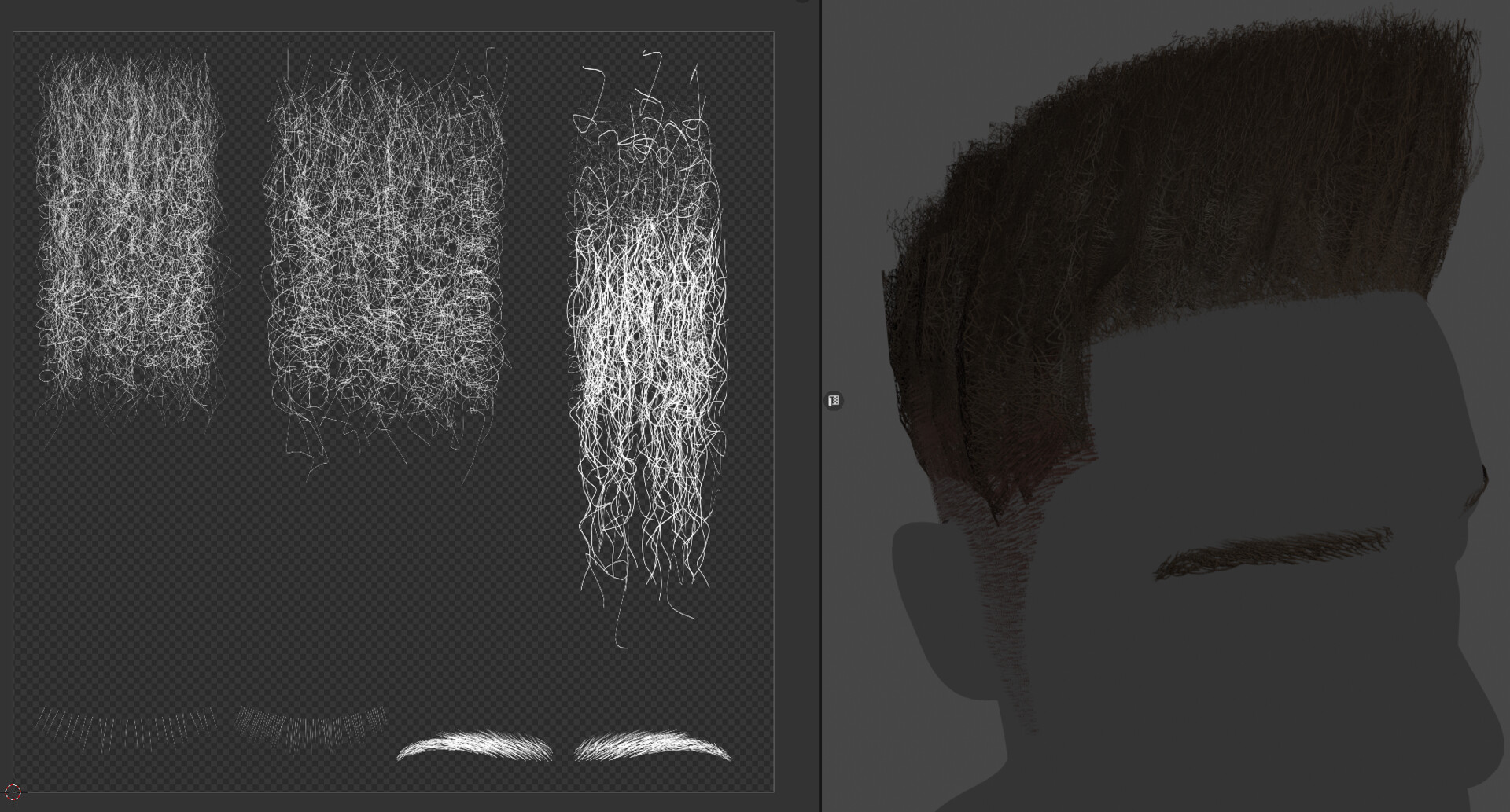
Kinky/coily hair really depend on the texutres you bake for the cards more so than straight or mildly curly hair. Its just too dense to model most of the time.


This style I used 'curves from grid surfaces' so my first step was modeling the primary giude cards over the sculpt. Blender retopo has 'bsurfaces' to quickly draw polygons like this.


breaking down the style

For this hairstyle I used regular blender curve profiles rather than the hair tool, but If I had made some straight braid meshes I could have used the 'mesh with UV profile' as I do in later styles.

again a lot of work here was in making the texture of the braids


breaking down the multiple zones of hair. Or the braided roots I had the strands 'clump to parent' strands to make the bunches.

adding a little bit of fuzz at the end. If I did this again I'd add a few cross-cut strips to the braids meshes before drawing curves and use the mesh profile type.

a tip for when using tube curves to see where the UV seam will be. Using mesh profile could sidestep this.


For the buzz cut length hair, I generated very fine very dense tube hairs like you'd see in cinematics, but then baked that hair to scalp and chin meshes to get a realtime friendly polycount. Longer hair cards then build on this.


taking a look at the hair textures. Noisy but not too wavy texture using actual geometry coils.

Darken the roots with a gradient that maps to UV space.

with so much hair, if you can get away with automatic reduction, go for it.


For this style I used the 'mesh with UV' profile mode. I modeled straight tubes with the spiral and then refernced those meshes for the drawn hair curves. This allowed the geometry to be more complex, have multiple layers, and keep it's UVs.

This style was entirely hand placed curves so none of them would interpenetrate.


a bonus exercise at the end here showcasing the value of the mesh profile for Sora/Cloud anime style hair that has an opaque core with a few alpha cards around each clump.

Make one or multiple base forms & populate a hair shape.

convert the hairs to geometry and then use those meshes as guides to spawn cards.
